
Test for DNS and Cloudflare updates.
This post is to confirm a connection to the NEW web site.

Test for DNS and Cloudflare updates.
This post is to confirm a connection to the NEW web site.
This is a test post.
Testing IONOS hosted WordPress.
This is only a test.
This is a test post after updating the server, changing the theme, and updating WordPress configuration.
I recommend you keep your Windows OS patched and be sure to update all the software you use. I run Windows Defender for antivirus and malware in conjunction with securing my browser and using a DNS that filters malicious sites.
I don’t recommend third party security/network software. If you feel better running a third party product, stick with something like Bitdefender,
I also recommend running ‘beta’ releases for the major browsers (links below) and use a public DNS service that filters malware. I typically use Cloudflare, Quad9, and Hope this helps.
Beta links for Chrome, Edge, and Firefox
Google Chrome Beta
https://www.google.com/chrome/beta/
Microsoft Edge Beta
https://www.microsoft.com/en-us/edge/download/insider?form=MA13FJ
Mozilla Firefox Beta
https://www.mozilla.org/en-US/firefox/channel/desktop/
Quad9 DNS
https://quad9.net/
Cloudflare 1.1.1.1
Speed up your online experience with Cloudflare public DNS resolver.
https://developers.cloudflare.com/1.1.1.1
OpenDNS
DNS SERVICES FOR YOUR HOME OR SMALL BUSINESS.
https://www.opendns.com/home-internet-security/
OpenDNS
Free for: Personal or business use for Enhanced DNS; personal use only for other home and family services
DNS addresses: 208.67.222.222 and 208.67.220.220
“FamilyShield” DNS addresses: 208.67.222.123 and 208.67.220.123
With more people streaming and general Internet use increasing, I get questions about measuring home Internet performance. I recommend using the three sites listed below. I have them in the order I prefer and have comments regarding each site.
Cloudflare – more technical detail and appears very accurate, no ads.
Netflix – change settings to enable more technical detail and save your configuration, very accurate, and no ads.
Ookla – similar accuracy as Cloudflare and Netflix, but less technical detail and *littered* with ads.
Cloudflare Speed Test
https://speed.cloudflare.com/
Netflix Speed test
https://fast.com/
Ookla Speed test
https://www.speedtest.net/
Friends and family have asked about antivirus and security recommendations. This is a quick summary of my best practices to keep your desktop or laptop secure.
Keep your system updated. Set Windows Update to run automatically or manually run it weekly. Pay attention to Microsoft Patch Tuesday.
Antivirus – I recommend using Microsoft Defender. There are others, but the consumer version of Defender is solid, it is less likely to impact other programs, it doesn’t impact performance, and combined with other safe computing practices is a solid antivirus/malware solution.
Browsers – Edge, Chrome, Firefox, all are secure. I recommend installing the beta channels for all browsers. They have proven to be very stable, and you avoid ‘day zero’ exploits.
Browser add-ons – install an ad blocker. Don’t think twice. Install an ad blocker, and make sure it’s uBlock Origin, the one with this logo: 
I avoid frequent changes to my home network. My stated goal is to design and install a reliable, secure network and keep it updated, but otherwise leave it alone. About five years ago, I took advantage of a Cisco program for free Meraki software for completing a professional certification class and exam. Now the program has expired, and I needed to replace the MX64 security appliance.
Moving from a commercial security device to a consumer product, I wanted to get something simple, but flexible. I’ve always been interested in open-source products, and considered ‘rolling my own’ firewall, but finding cost effective, silent (fanless) computer with multiple gig Ethernet ports in the current (Nov 2022) market was a challenge. Also, there’s still a huge supply chain issue that I expect through 2023 and I don’t want to buy from China. Not a nationalist issue, but I don’t trust security appliances from China (https://www.dhs.gov/news/2020/12/22/dhs-warns-american-businesses-about-data-services-and-equipment-firms-linked-chinese).
Selection Process
Super simple – I looked at consumer products and found they weren’t flexible enough for my use, some products were discontinued, others are on back order. I wanted to spend under $300 and narrowed the search to Ubiquiti Networks and Netgate (pfSense). Ubiquiti availability was an issue, and Netgate was less expensive, so I went with the entry level Netgate 1100.
Although the GUI lagged during the installation, subsequent configuration changes and overall performance of the device has been good. I’ve updated the default configuration by disabling IPv6, not using VPN or packet inspection, using PiHole on a spare Raspberry Pi instead of using Netgate services.
I would call this a ‘prosumer’ product – you can’t install and use this product without reading the manual and understanding the basics of TCP/IP networking. However, it’s much more flexible than the average consumer product and using pfSense open-source software provides greater security and longer support life (IMHO).
Performance
Performance is equivalent to the Meraki MX64. We have >20 devices on our home network including three Roku devices streaming 1080p (not 4K). If you plan to implement low level security, ad blocking, and other features, consider the 2100 model.
Recommendation
Home Network

Netgate running statistics

Internet speed
Comcast – 300 Mbps download, 12 Mbps upload
Attempting to update PiHole from the command line, I received the error below:

[i] Downloading and Installing FTL…curl: (77) error setting certificate verify locations: CAfile: /etc/ssl/certs/ca-certificates.crt CApath: /etc/ssl/certs
[✗] Downloading and Installing FTL
Error: URL https://github.com/pi-hole/ftl/releases/latest/download/pihole-FTL-armv7-linux-gnueabihf not found
[✗] FTL Engine not installed
Unable to complete update, please contact Pi-hole Support
I searched the /setc/ssl/certs folder and didn’t find anything out of the ordinary.
Updated CA Certificates:
sudo update-ca-certificates
After this, re-running pihole update worked correctly.

I got an e-mail from AT&T/DirecTV asking me to complete a survey on why I unsubscribed from DirecTV Now. I spent quite a bit of time crafting a comprehensive answer, only to receive the notice below. Part of my issue with DirecTV was the poor interface design. I now extend that criticism to the survey. If you limit my response to 999 characters, why not tell me? Then I won’t prepare a response that’s 302% larger than you will allow!
NOTE – there were two other text boxes, both limited the number of characters to other, smaller, and random quantities, both with no indication of what the limit would be.
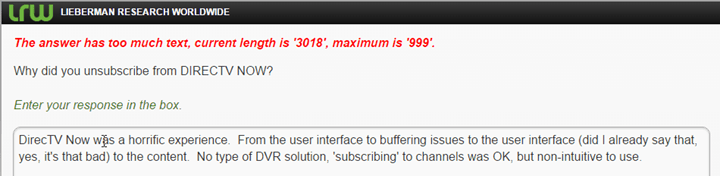
Here is my full response about why I unsubscribed from DirecTV Now:
DirecTV Now was a horrific
experience. From the user
interface to buffering issues to the user interface (did I already say that,
yes, it’s that bad) to the content. No type of DVR solution, ‘subscribing’ to channels was OK, but
non-intuitive to use.
No CBS channel. At all. Yes, I know you
have to negotiate with CBS, but it’s a gaping hole. I added HBO and got two HBO channels added, which was underwhelming. Even at $35/month rate it wasn’t worth
the money. We watched ONE movie
(Deadpool) and the last 20 minutes of the film took almost an hour to watch due
to buffering issues.
Just so you don’t assume I have a poor Internet
connection, I have 200/10 Mbps (up/downlink speeds) and a commercial grade
firewall and wireless AP (Meraki). Chemical engineer by degree, working in IT and connected to the Internet
since 1986 (not a typo), Cisco and other certifications. Let’s just assume the problem is on your end and not my home
network…
Streaming from a laptop to a Chromecast was
USELESS. I stream other content
(YouTube, other) to Chromecast with no issues using the exact same configuration
(laptop, wireless channel, etc). Streaming from my PHONE (!!!) worked better than the laptop, and I can’t
account for that. Is the Android
app that much more efficient than streaming from a browser on a
laptop?
No Roku support out of the gate. Roku and beer are gifts from GOD, and you don’t support the Roku. Seriously?
I took advantage of the free Amazon Fire offer because,
as noted, you don’t support the Roku (aka, Gift From God). Nice device, but DirecTV sucks at life, so we were ‘less than pleased’
with the experience. We attempted
to watch Deadpool (previous reference) using the Amazon Fire. Other services worked fine, but not DirecTV Now.
And, the user interface sucks. As an example, I saved ‘favorite’ channels in the guide and selected
Favorites to display. It’s all too
easy to suddenly have every channel displayed. Next, I can’t seem to pause, continue,
and skip over content (like my DirecTV DVR). Yes, I realize there are device
constraints (but, shall I note, not on the Roku), but you’re not even
trying. Did you pull one of those
“Design this for free and I’ll give you great recommendations” with the
interface design team? Because it
LOOKS like that’s what you did.
I’m doing this all from memory. It’s like a nightmare where I can still see the screen doing something I
don’t want/like, oh, and the BUFFERING, Oh, the BUFFERING!!!
To summarize:
– User interface sucks
– No DVR capability
– No Roku support
– Buffering issues (with long shows? You tell me)
– No CBS content
– Poor performance with Amazon Fire
– Poor performance with Chromecast
= DirecTV Now Sucks at life
That’s the short version of why I unsubscribed from
DirecTV Now. I’m working furiously
to experiment with OTA TV, a local DVR, and cloud based services. I’m willing to bet anything I put together will be a better, more
satisfying experience than DirecTV Now.
Love,
Paul & Barb
A family friend came down to visit, and he got a bit lost. One way to avoid this is to look up an address on Google Maps and save it to your GPS. This also helps you get an idea of what routing options you have for your trip.

Select the address, then click More and select Send

On the Send dialog box, you have the option of sending the address to your GPS.
NOTE – you need to have the GPS connected to your PC and turned on so Google Maps can communicate with the GPS.


